
hadow.fr
 openPGP public key
 Matrix.org
 Gitea
Gitea- GitHub
sam(dot)hadow(at)proton(dot)me
prefer Matrix if you want to use E2EE
@fire:hadow.fr
main git
Installing Kodi On A Raspberry Pi 5
by Sam Hadow
I recently got a raspberry Pi 5 with 8GB of RAM and wanted to install Kodi on it. OSMC isn’t available for the Pi 5, and I didn’t want to use LibreELEC to still have a debian base and be able to run other scripts and services from the Pi. In this blog post I’ll show you how I did this installation.
steps
1. Preparing the base system
I decided to go with a minimal install of debian 13. In raspberry Pi imager it’s in the “Raspberry Pi OS (other)” category.
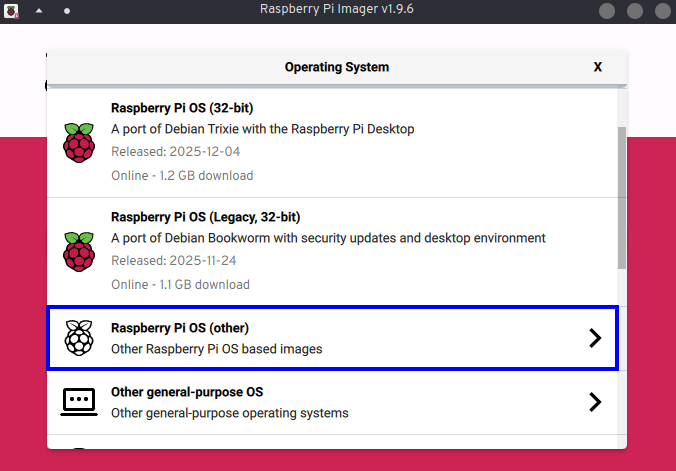
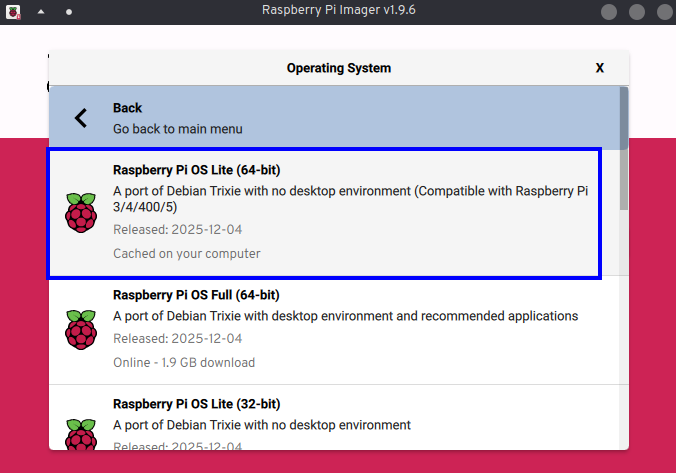
Unfortunately with the Pi 5, the configuration from the imager letting you configure a user and the SSH when flashing the micro SD card seems to be broken so I configured it manually after flashing the Pi 5 when booting it for the first time. It asks for the user creation and password and then I just enabled SSH with:
systemctl enable --now ssh
(the service is ssh and not sshd on the Pi, it’s not a typo)
2. installing the required packages
First we need to install kodi and some packages to have sound and a minimal GUI support.
sudo apt install kodi weston mesa-utils mesa-vulkan-drivers pipewire wireplumber pulseaudio-utils
3. running Kodi
3.1) I first created a dedicated user and added it to the required groups to run Kodi as a systemd service:
sudo useradd -m kodi
sudo usermod -aG video,audio,input,render kodi
3.2) Then I enabled autologin for kodi on TTY1
sudo mkdir -p /etc/systemd/system/getty@tty1.service.d
and in this folder I created this file:
#/etc/systemd/system/getty@tty1.service.d/autologin.conf
[Service]
ExecStart=
ExecStart=-/sbin/agetty --autologin kodi --noclear %I $TERM
3.3) Then I enabled lingering for Kodi (which is needed to start user systemd services even without a shell session)
sudo loginctl enable-linger kodi
3.4) Finally I created and enabled the service to start Kodi on boot:
First creating the folder:
sudo mkdir -p /home/kodi/.config/systemd/user
And then a service unit file:
#/home/kodi/.config/systemd/user/kodi.service
[Unit]
Description=Kodi Media Center (DRM/GBM)
After=systemd-user-sessions.service
Wants=systemd-user-sessions.service

[Service]
ExecStart=/usr/bin/kodi \
  --standalone \
  --drm \
  --tty=/dev/tty1

Restart=on-failure
RestartSec=3

[Install]
WantedBy=default.target
After this making sure the ownership is correct:
sudo chown -R kodi:kodi /home/kodi
And then to enable the service:
sudo systemctl --user --machine=kodi@.host daemon-reload
sudo systemctl --user --machine=kodi@.host enable kodi
And Finally:
sudo reboot
4. checking logs
To check Kodi related logs, we can use the following command:
sudo journalctl _UID=$(id -u kodi)
It’ll show all the journalctl logs from the kodi user.
tags: sysadminCopyright (c) December 2025 Sam Hadow Verbatim copying and redistribution of this entire page are permitted provided this notice is preserved.