
hadow.fr
 openPGP public key
 Matrix.org
 Gitea
Gitea- GitHub
sam(dot)hadow(at)proton(dot)me
prefer Matrix if you want to use E2EE
@fire:hadow.fr
main git
First Steps With An Evilcrow Cable Wind
by Sam Hadow
This blog post is a guide on how to flash an EvilCrow Cable Wind and how to use it running your first payload. The model used in this blog post is the USB A to USB C version. This guide also assumes you’re using a linux distribution as your operating system, preferably Archlinux.
Steps
1. Preparing the environment
1.1. Installing Arduino IDE and the required libraries
First install esptool and pyserial, on Archlinux this can be done with the command sudo pacman -S esptool python-pyserial
Then install the Arduino IDE. On Archlinux it’s available in the AUR as the package arduino-ide-bin.
Once it’s installed, you’ll need to add 3 libraries in your Arduino library directory (usually located in ~/Arduino/libraries).
- copy and unzip the USB library included in the repository in EvilCrowCable-Wind/modified-libraries/
- copy and unzip the husarnet-esp32-arduino library included in the repository in EvilCrowCable-Wind/modified-libraries/
- download the ArduinoJSON library with
git clone https://github.com/bblanchon/ArduinoJson.git
1.2. Installing the boards manager
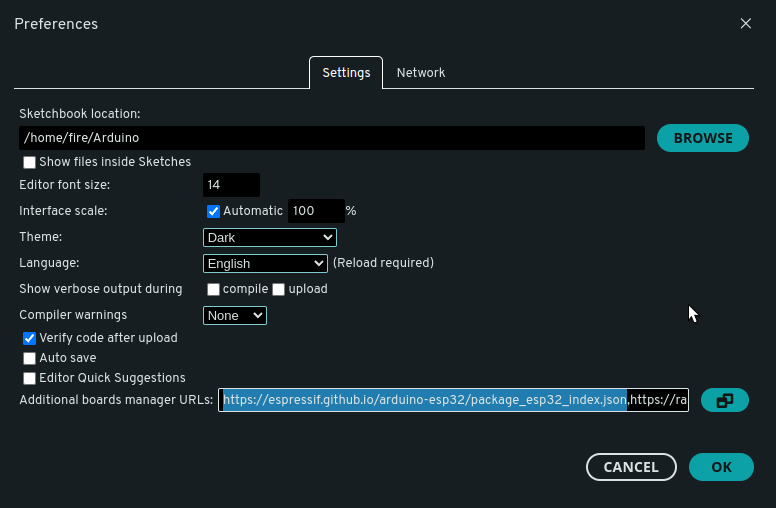
Open Arduino IDE and go to File > Preferences and in the field “Additional Board Manager URLs:” add
https://espressif.github.io/arduino-esp32/package_esp32_index.json
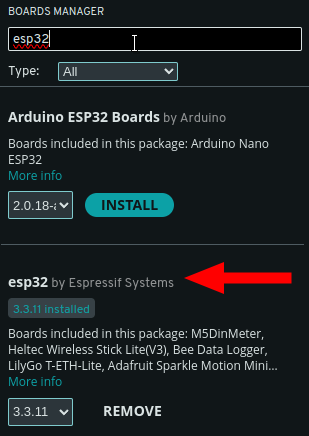
Then in Tools > Board > Boards Manager, search for “esp32” and install “esp 32 by Espressif Systems”
2. Flashing the firmware
2.1. Plugging the EvilCrow Cable Wind in flash mode
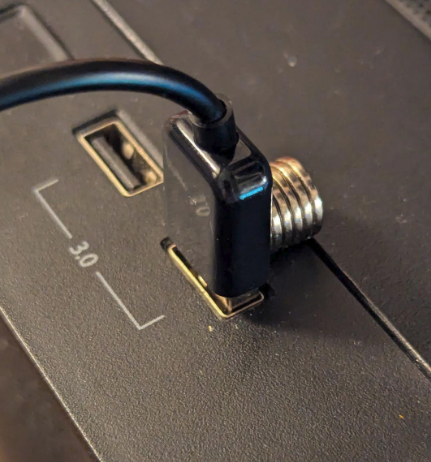
Place a magnet on the active end (USB A) of the EvilCrow Cable Wind and connect it to the computer, it should be recognized as “USB JTAG/serial debug unit” in dmesg (sudo dmesg --follow). Example output:
[ 4371.460527] usb 1-9: new full-speed USB device number 32 using xhci_hcd
[ 4371.585041] usb 1-9: New USB device found, idVendor=303a, idProduct=1001, bcdDevice= 1.01
[ 4371.585060] usb 1-9: New USB device strings: Mfr=1, Product=2, SerialNumber=3
[ 4371.585068] usb 1-9: Product: USB JTAG/serial debug unit
[ 4371.585075] usb 1-9: Manufacturer: Espressif
[ 4371.585080] usb 1-9: SerialNumber: 10:51:DB:38:6E:9C
[ 4371.589316] cdc_acm 1-9:1.0: ttyACM0: USB ACM device
2.2. Flashing the firmware
Open EvilCrowCable-Wind/firmware/firmware.ino in Arduino IDE from the repository. You can modify in this file the password and SSID of the access point the ESP32 will try to connect to. By default it’s Evil Crow Cable Wind for the SSID and 123456789 for the password. I recommend changing these values.
Then in Tools, select your port and the board “ESP32S3 Dev Module”, in my case the port is ACM0, but it could be USB0 or another port. And configure all the parameters as follow:
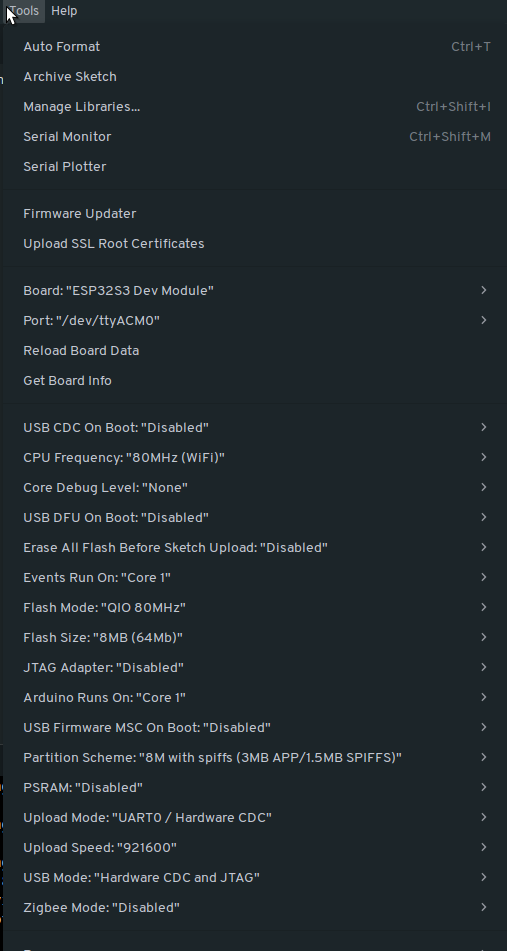
Specifically:
| # | Setting | Value |
|---|---|---|
| 1 | USB CDC On Boot | Disabled |
| 2 | CPU Frequency | 80MHz (Wi-Fi) |
| 3 | Core Debug Level | None |
| 4 | USB DFU On Boot | Disabled |
| 5 | Erase All Flash Before Sketch Upload | Disabled |
| 6 | Events Run On | Core 1 |
| 7 | Flash Mode | QIO 80MHZ |
| 8 | Flash Size | 8MB (64Mb) |
| 9 | JTAG Adapter | Disabled |
| 10 | Arduino Runs On | Core 1 |
| 11 | USB Firmware MSC On Boot | Disabled |
| 12 | Partition Scheme | 8M with SPIFFS (3MB APP/1.5MB SPIFFS) |
| 13 | PSRAM | Disabled |
| 14 | Upload Mode | UART0 / Hardware CDC |
| 15 | Upload Speed | 921600 |
| 16 | USB Mode | Hardware CDC and JTAG |
| 17 | Zigbee Mode | Disabled |
3. Using the EvilCrow Cable Wind
3.1. Connecting to the cable
Upon start the EvilCrow Cable Wind will try to connect to a network with the SSID and password specified in the firmware, so first setup an access point with a phone or laptop and then plug in the active end (USB A) of the EvilCrow Cable in a computer.
Theorically the cable should be accessible at http://cable-wind.local but it doesn’t work well with a phone.
Instead you can connect a laptop (or use the laptop with the access point) to the access point and directly find the IP address of the cable.
- If you have a laptop setup as an access point:
ip neighbor - If you connected a laptop to the access point:
ip routeA possible output is:
default via 10.27.197.13 dev wlp2s0 proto dhcp src 10.27.197.114 metric 600
10.27.197.0/24 dev wlp2s0 proto kernel scope link src 10.27.197.114 metric 600
Then force the discovery of the devices on this subnetwork
sudo nmap -sn 10.27.197.0/24And find the host Espressif
Nmap scan report for 10.27.197.126
Host is up (0.21s latency).
MAC Address: XX:XX:XX:XX:XX:XX (Espressif)
You can then connect to the cable with this IP address.
3.2. Writing your first payload
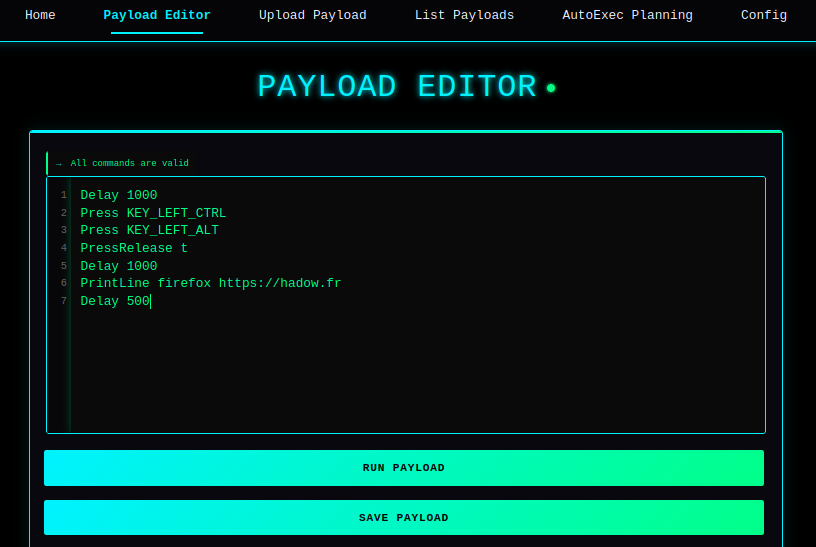
For example to payload a Linux running a desktop with CTRL+ALT+T shortcut to open a terminal (Like Gnome, KDE Plasma, XFCE, etc…) and open my website in firefox:
Delay 1000
Press KEY_LEFT_CTRL
Press KEY_LEFT_ALT
PressRelease t
Delay 1000
PrintLine firefox https://hadow.fr
Delay 500
As you can imagine, you can run much more complex payloads targeting a wide range of environments. As such it should be treated as a serious security tool, not as a harmless gadget or toy.
This is also why the paranoia around unknown USB cables isn’t entirely unjustified: you can’t always tell what’s hiding inside a cable. Use it only on systems you own or have explicit permission to payload.
Copyright (c) August 2026 Sam Hadow Verbatim copying and redistribution of this entire page are permitted provided this notice is preserved.