
hadow.fr
 openPGP public key
 Matrix.org
 Gitea
Gitea- GitHub
sam(dot)hadow(at)proton(dot)me
prefer Matrix if you want to use E2EE
@fire:hadow.fr
main git
Bad Usb With A Digispark Attiny85
by Sam Hadow
This short blog post explains how to use a Digispark Attiny85 as a bad USB device.
Steps
0. The board itself
The board looks like this:
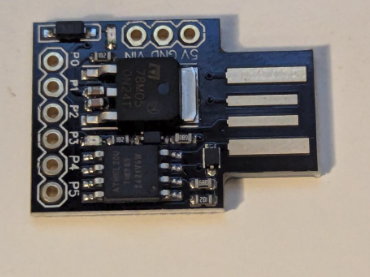
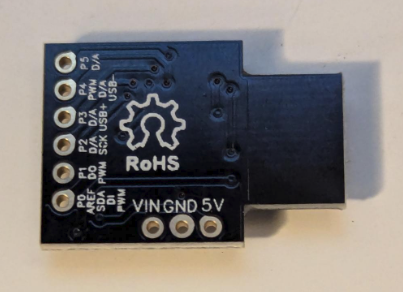
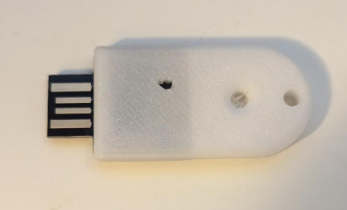
And with a 3d printed case like this one it can even look like a somewhat genuine USB stick:
1. Preparing the environment
1.1. Installing Arduino IDE and the required libraries
First install micronucleus, on Archlinux this can be done with the command sudo pacman -S micronucleus
Then install the Arduino IDE. On Archlinux it’s available in the AUR as the package arduino-ide-bin.
1.2. Installing the boards manager
Open Arduino IDE and go to File > Preferences and in the field “Additional Board Manager URLs:” add:
https://raw.githubusercontent.com/digistump/arduino-boards-index/master/package_digistump_index.json
If you have multiple additional board manager URLs you can separate them with a comma: ,
Then in Tools > Board > Boards Manager, search for “digispark” and install “Digistump AVR Boards”
2. Flashing a payload
Select in Tools > Board > Digistump AVR Boards, the board “Digispark (Default - 16.5mhz)”
Then create a sketch and write your bad USB payload, for example:
#include "DigiKeyboard.h"

void setup() {
  // Give Linux time to enumerate the Digispark as a keyboard.
  DigiKeyboard.delay(1000);

  // Open a terminal.
  DigiKeyboard.sendKeyStroke(KEY_T, MOD_CONTROL_LEFT | MOD_ALT_LEFT);
  DigiKeyboard.delay(1000);

  // Launch Firefox.
  DigiKeyboard.print("firefox https://hadow.fr");
  DigiKeyboard.sendKeyStroke(KEY_ENTER);
}

void loop() {
}
(Please note that this payload will work only with a QWERTY layout)
You can also find payloads here and here.
Then upload the sketch, in the output you should see:
Sketch uses 2944 bytes (48%) of program storage space. Maximum is 6012 bytes.
Global variables use 162 bytes of dynamic memory.
Running Digispark Uploader...
Plug in device now... (will timeout in 60 seconds)
Plug in your device and you should see:
> Please plug in the device ...
> Press CTRL+C to terminate the program.
> Device is found!
connecting: 16% complete
connecting: 22% complete
connecting: 28% complete
connecting: 33% complete
> Device has firmware version 1.6
> Available space for user applications: 6012 bytes
> Suggested sleep time between sending pages: 8ms
> Whole page count: 94  page size: 64
> Erase function sleep duration: 752ms
parsing: 50% complete
> Erasing the memory ...
erasing: 55% complete
erasing: 60% complete
erasing: 65% complete
> Starting to upload ...
writing: 70% complete
writing: 75% complete
writing: 80% complete
> Starting the user app ...
running: 100% complete
>> Micronucleus done. Thank you!
You can then unplug your device and plug it into a computer to execute the payload.
Disclaimer: Only plug in this device in computers you are allowed to.
This short blog post also demonstrates why you should never pick up random USB sticks from the ground and plug them into your computer.
tags: cybersecurity - hardwareCopyright (c) August 2026 Sam Hadow Verbatim copying and redistribution of this entire page are permitted provided this notice is preserved.